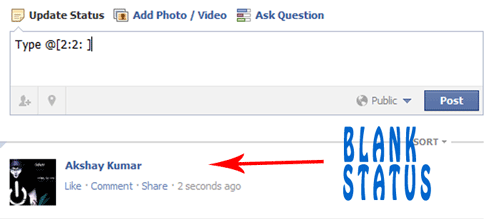
Facebook has recently made changes to its
chat features. Now we can use profile images in chat. You can even type anything in colour using a simple trick. You just need to know how to get
facebook profile id which you will learn by reading this article
Trick to find facebook profile id. Below are codes of A-Z and guide on how to use them in chat.
1. How to use facebook profile images in chat ?
- To use profile images in chat Enter this ==> [[username]]
- In place of username enter username of person whose image you want to show in chat.
- If u will enter c00lhacks this will show image of my page.
2. Codes of A-Z for Facebook chat.- Below are codes of A-Z which you can use in facebook chat. You can create your on words with this codes. I will demonstrate how to do that .
[[107015582669715]] = A
[[116067591741123]] = B
[[115602405121532]] = C
[[112542438763744]] = D
[[115430438474268]] = E
[[109225112442557]] = F
[[111532845537326]] = G
[[111356865552629]] = H
[[109294689102123]] = I
[[126362660720793]] = J
[[116651741681944]] = K
[[115807951764667]] = L
[[106596672714242]] = M
[[108634132504932]] = N
[[116564658357124]] = O
[[111669128857397]] = P
[[107061805996548]] = Q
[[106699962703083]] = R
[[115927268419031]] = S
[[112669162092780]] = T
[[108983579135532]] = U
[[107023745999320]] = V
[[106678406038354]] = W
[[116740548336581]] = X
[[112416755444217]] = Y
[[165724910215]] = Z
3. How to use this codes ?- First think wat word you want to create then pick up codes of that alphabate from above codes
- Let us create hi . So pick up codes of H and I .
- After that enter this in chat box [[111356865552629]] [[109294689102123]]
- Make sure there is space in between any two codes or else it will not work.
4. Some Cool Facebook tricks.- Below are two codes to show Happy New year you can use any one of them
[[124641767652266]] [[124642810985495]] [[124643044318805]] [[124643044318805]] [[124643487652094]] [[124642300985546]] [[124644090985367]] [[124644404318669]] [[124644567651986]] [[124642300985546]] [[124643487652094]] [[124644404318669]] [[124642810985495]] [[124645367651906]] [[124642300985546]] [[124645977651845]] [[124646247651818]] [[124646574318452]] [[124645977651845]] [[124642300985546]]
OR
[[337992182896839]] [[225777904163650]] [[244015585667152]] [[244015585667152]] [[319152701438185]] [[188142511282558]] [[319977728035866]] [[316759491692170]] [[139287272851910]] [[188142511282558]] [[319152701438185]] [[316759491692170]] [[225777904163650]] [[337598512918963]] [[188142511282558]] [[141281852650929]] [[268263169900550]] [[191790684249921]] [[141281852650929]]
- Enter below codes to show Cool Hacking Tricks
[[115602405121532]] [[116564658357124]] [[116564658357124]] [[115807951764667]] [[111356865552629]] [[107015582669715]] [[115602405121532]] [[116651741681944]] [[109294689102123]] [[108634132504932]] [[111532845537326]] [[112669162092780]] [[106699962703083]] [[109294689102123]] [[115602405121532]] [[116651741681944]] [[115927268419031]]
- This way you can create your own words your name .
- Hope you like it subscribe below for such more tutorials and feel free to leave comments.
More Facebook Tricks